How to Give Franchisees Marketing Freedom While Maintaining Brand Control
Configure how head office and franchise owners collaborate on marketing, with granular settings to manage what local teams can access, edit and create
Every franchise organization has its own approach to national and local marketing. Some brands prefer to have head office manage most advertising and social media activity, while others encourage franchise owners to play an active role in creating and customizing local marketing.
Franify is a franchise marketing platform that helps head office create, localize, distribute and measure advertising and social media across a franchise network, while controlling how much franchisees participate in the process.
Franify is designed to support a wide range of franchise marketing operating models through highly configurable marketing controls, permissions, workflows and distribution capabilities. Head office can manage and localize marketing across the network without requiring franchisee participation, or it can determine which marketing capabilities franchisees have access to and exactly which elements they are able to edit.
These settings can be established across the franchise organization and adjusted for individual campaigns and social posts where appropriate. This gives national teams the ability to create workflows that reflect the brand, the marketing activity and the capabilities of their franchisees.
A franchise organization might manage advertising and social media entirely from head office, using Franify to localize and distribute marketing across individual franchise markets. Another might allow local owners to change advertising imagery and copy while keeping audience targeting under head office control. Another might allow experienced franchisees to modify geography, targeting, creative and individual ads. A more guided model might provide completed campaigns where the local owner's primary responsibilities are choosing whether to participate, selecting locations, setting a budget and launching.
Franify gives the franchise organization the flexibility to configure the platform to suit the network's specific business rules and workflows.
Key takeaways
Support multiple franchise marketing operating models
Franify allows the same franchise organization to support fully head-office-managed marketing, guided franchisee participation, collaborative national-to-local workflows and more locally led marketing. Different models can operate concurrently depending on the campaign, market, Group or capabilities of the franchisee.
Manage localized marketing entirely from head office
Franchisee participation is optional. Head office can create, programmatically localize, distribute and measure advertising and social media across individual franchise markets without requiring local owners to log in or manually customize the marketing.
Configure exactly what franchisees can access, edit and create
Franify provides granular controls over advertising, social media and customer engagement. Head office can determine which workflows are available and which elements local users can modify, including targeting, creative, copy, scheduling, content creation and customer communication.
Establish network-wide defaults and adjust individual marketing initiatives
National administrators can establish organization-wide settings that provide a consistent starting point across the franchise network. Those settings can then be adjusted for individual advertising campaigns and social posts when a different level of local participation is appropriate.
Support different levels of local marketing participation
Franify can provide a highly guided experience for franchisees who want head office to manage more of the marketing process, while also supporting franchisees, multi-unit operators and local marketing teams that want greater involvement in campaign creation and customization.
Organize access and marketing distribution around Accounts, Locations, Groups and user roles
Franify separates Accounts, Locations, Groups and user roles so access can reflect how the franchise organization actually operates. Multi-unit owners can work across several locations, individual managers can be limited to their own businesses, and Groups can determine which locations receive specific campaigns, content and assets.
Keep national and local marketing connected in one system
Whether marketing is created by head office, collaboratively with franchisees or locally, activity can remain within Franify's shared marketing infrastructure. This allows national teams to maintain visibility while local users work with the campaigns, assets, localization tools and reporting made available to them.
Why franchise marketing needs configurable workflows
Franchise marketing involves a relationship that conventional advertising and social media platforms were not designed to manage. Head office is responsible for the broader brand and marketing strategy, while individual franchise owners operate businesses in distinct local markets.
Those local businesses can have different priorities. Services may vary by location, promotions may only apply in certain markets, and individual franchisees may want to invest different amounts in local marketing.
Franchise owners can also have very different levels of marketing expertise. One owner may want a campaign that is completely prepared by head office and takes only a few minutes to activate. Another may understand digital advertising well and want to adjust targeting, creative and messaging for a specific local opportunity.
The appropriate level of head office control can also change depending on the marketing activity. A major national brand campaign may require tight coordination, while a local lead generation campaign may benefit from greater franchisee input.
Franify gives franchise organizations a configurable framework for managing all of these approaches, including marketing that is managed entirely by head office, marketing that involves selected franchisee participation and marketing that gives local teams greater responsibility.
How Franify Uses Key Franchise Marketing Terms
| Term | Definition |
|---|---|
| Head office / national team | The corporate or franchisor-level marketing organization responsible for strategy, governance and network-wide marketing. |
| Local user | A franchisee, multi-unit operator, store manager or other user with access to one or more franchise locations. |
| Location | An individual franchise business or location record associated with marketing, users and reporting. |
| Account | The access structure that connects one or more users with one or more franchise locations. An Account can contain a single Location or multiple Locations. |
| Group | A reusable way to organize franchise Locations for marketing distribution, campaign access, asset sharing, social publishing and reporting. A Location can belong to multiple Groups. |
| User role | The level of functional access assigned to a local user within an Account. Franify supports Local Admin, Editor and Viewer roles. |
| Permission | A configurable setting that determines whether a local user can access, create, edit or manage a particular marketing capability or element. |
| Organization-wide settings | Default marketing permissions established by head office for the franchise organization. |
| Campaign or post-level override | A configuration that allows head office to adjust the default permissions for an individual advertising campaign or social post. |
| Head-office-managed marketing | A broader operating model in which head office creates, localizes, distributes and manages marketing without requiring franchisee participation. |
| Head Office Managed advertising | Franify's advertising model in which head office creates, funds, localizes and manages advertising without requiring franchisee participation. |
| Managed Campaign | A professionally prepared advertising campaign that eligible franchisees can review and activate through a simplified workflow. |
| Start From Template | A head-office-created campaign framework in which franchisees can customize only the elements the organization has made editable. |
| Create Your Own Campaign | A local advertising workflow that allows authorized franchisees to build new campaigns within Franify. |
| Programmatic localization | The use of structured location data, dynamic variables, targeting rules and automation to adapt centrally created marketing for individual franchise markets. |
| National-to-local franchise marketing | A marketing model in which head office establishes a common strategy, framework or resources while execution and participation can vary across individual franchise Locations. |
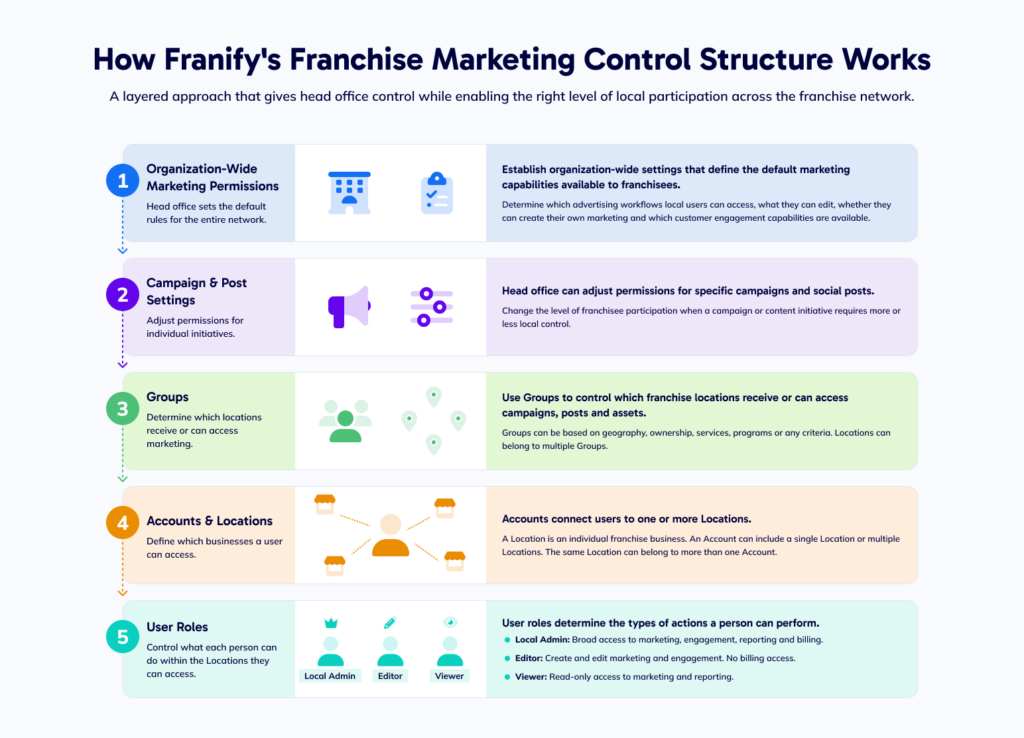
How Franify’s Franchise Marketing Control Structure Works
Franify uses several complementary layers of control to manage how head office and local users work together across advertising, social media and other franchise marketing activities.
These controls allow the franchise organization to establish broad rules for the network while still adapting access and participation for specific campaigns, groups of locations and individual users.
Set Organization-Wide Marketing Permissions
Head office can establish organization-wide settings that define the default marketing capabilities available to franchisees. These settings can determine which advertising workflows local users can access, what parts of campaigns or social posts they can edit, whether they can create their own marketing, and which customer engagement capabilities are available.
The organization-wide settings provide a consistent starting point for how franchisees work within Franify.
Adjust Permissions for Individual Campaigns and Social Posts
The default organization settings do not need to apply identically to every marketing initiative. Head office can adjust permissions for individual campaigns and social posts when a different level of local participation is appropriate.
For example, a franchise organization may normally allow local users to edit advertising copy and creative, while a major national campaign may use more restrictive settings. Another campaign may give franchisees greater control over geography, imagery or messaging because local market knowledge is particularly valuable.
This allows the level of franchisee participation to change according to the campaign or content being distributed.
Use Groups to Determine Which Locations Receive Marketing
Franify Groups provide another layer of control by determining which franchise locations receive or can access specific marketing resources. Groups can be used to distribute advertising campaigns, social content, images and videos to selected parts of the franchise network.
For example, head office could create a campaign specifically for Western US locations, new franchise locations, a particular multi-unit ownership group or locations offering a specific service. Only the locations included in the applicable Group would receive or have access to that marketing opportunity.
A franchise location can belong to multiple Groups at the same time, allowing the organization to create overlapping structures around geography, ownership, products, services, marketing programs or other business requirements.
Use Accounts and Locations to Control Which Businesses a User Can Access
Franify separates Accounts from Locations so user access can reflect the real ownership and management structure of the franchise system. A Location represents an individual franchise business. An Account can provide access to one or more Locations.
For example, a multi-unit franchise owner could have one Account containing five Locations, giving the owner access across the full portfolio. A store manager could have a separate Account containing only the individual Location they manage.
The same Location can therefore be accessible through more than one Account where appropriate. This allows Franify to determine which franchise businesses each user can see and manage without requiring every person associated with a Location to have access to the same broader portfolio.
Use User Roles to Control What Each Person Can Do
Once a user has access to a local Account and its associated Locations, their user role determines the types of actions they can perform.
Franify supports local roles including Local Admin, Editor and Viewer.
- A Local Admin can receive broad access to the local Franify environment, including available marketing, customer engagement, reporting and billing capabilities.
- An Editor can actively participate in marketing and customer engagement while remaining restricted from sensitive billing information.
- A Viewer receives read-only access to available marketing activity and reporting.
These roles allow access to reflect the responsibilities of different people within a franchise business.
Franify’s Control Layers Work Together
These different layers operate together rather than independently.
A simple way to understand the hierarchy is:
- Head office settings determine the permissions for local users.
- Campaign and post settings determine whether those permissions change for a specific marketing initiative.
- Groups determine which Locations receive or can access particular marketing resources.
- Accounts determine which Locations a user can access.
- User roles determine what that person can do within those Locations.
For example, a multi-unit owner may have Local Admin access to five franchise Locations, but that role does not override the marketing permissions established by head office. If the franchise organization has disabled Create Your Own Campaign for local users, giving the owner Local Admin access does not give them permission to create their own advertising.
This layered structure allows Franify to support complex franchise organizations without forcing every location, franchisee or marketing initiative into the same workflow. Head office can maintain network-wide governance while configuring local access around the organization, campaign, location structure and responsibilities of individual users.
Configure Franchisee Digital Advertising Access and Permissions
Franify provides head office with granular control over how franchisees can participate in digital advertising. National administrators can determine which advertising workflows are available to local users and, where customization is permitted, which elements of a campaign franchisees can access, edit or create.
Franify supports three local advertising workflows with progressively greater levels of franchisee involvement:
- Managed Campaign: Head office prepares the advertising and the franchisee primarily decides whether to participate, which locations to include, when the advertising should run and how much to invest.
- Start From Template: Head office creates the campaign framework and determines which elements the franchisee can customize.
- Create Your Own Campaign: Authorized franchisees can build new local advertising campaigns through Franify when head office has enabled that capability.
These local workflows can operate alongside Head Office Managed advertising, where the national team creates, funds, localizes and manages advertising without requiring franchisee participation.
A franchise organization does not need to choose one model for the entire network. Head office can enable different workflows for different campaigns, franchise locations, Groups or types of local users, allowing the level of franchisee participation to reflect the organization’s marketing strategy and operating model.

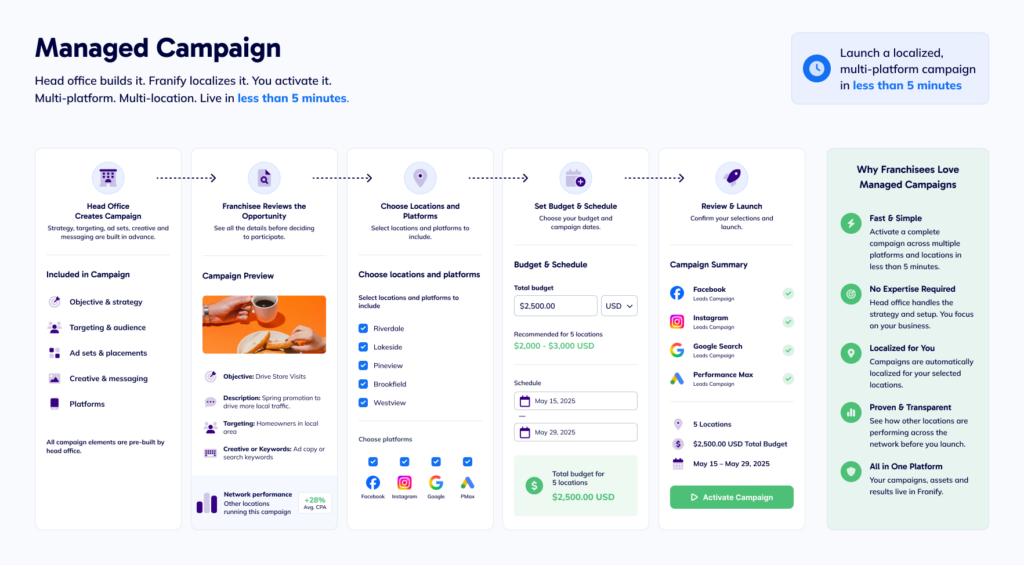
Managed Campaigns for Ready-to-Launch Advertising
Managed Campaigns give franchisees a fast and simple way to participate in digital advertising without requiring them to build or understand the underlying campaigns.
A Managed Campaign should not be confused with Head Office Managed advertising. With Head Office Managed advertising, the national team can create, fund and distribute localized advertising without requiring any franchisee action. With a Managed Campaign, head office prepares the advertising opportunity and the franchisee chooses whether to participate.
Head office can prepare campaigns across Meta, Google Search and Google Performance Max, including the strategy, targeting, creative, messaging and other campaign elements. Franify can then programmatically localize the advertising for participating franchise locations.
The franchisee focuses primarily on the local business decisions that matter:
- Whether to participate
- Which eligible location or locations to include
- When the advertising should run
- How much to invest
The franchisee can review the campaign opportunity, including available information about the objective, targeting, creative and participating advertising platforms, before deciding whether to activate it.
A ready-to-go, localized campaign spanning multiple advertising platforms and locations can be activated in less than five minutes.
Launch a localized, multi-platform campaign in less than 5 minutes
This makes Managed Campaigns useful for franchise organizations that want to increase local advertising participation while keeping campaign strategy and execution largely controlled by head office. Franchisees retain meaningful control over participation, timing and investment without needing expertise in Meta Ads Manager, Google Ads or the technical structure of the underlying campaigns.
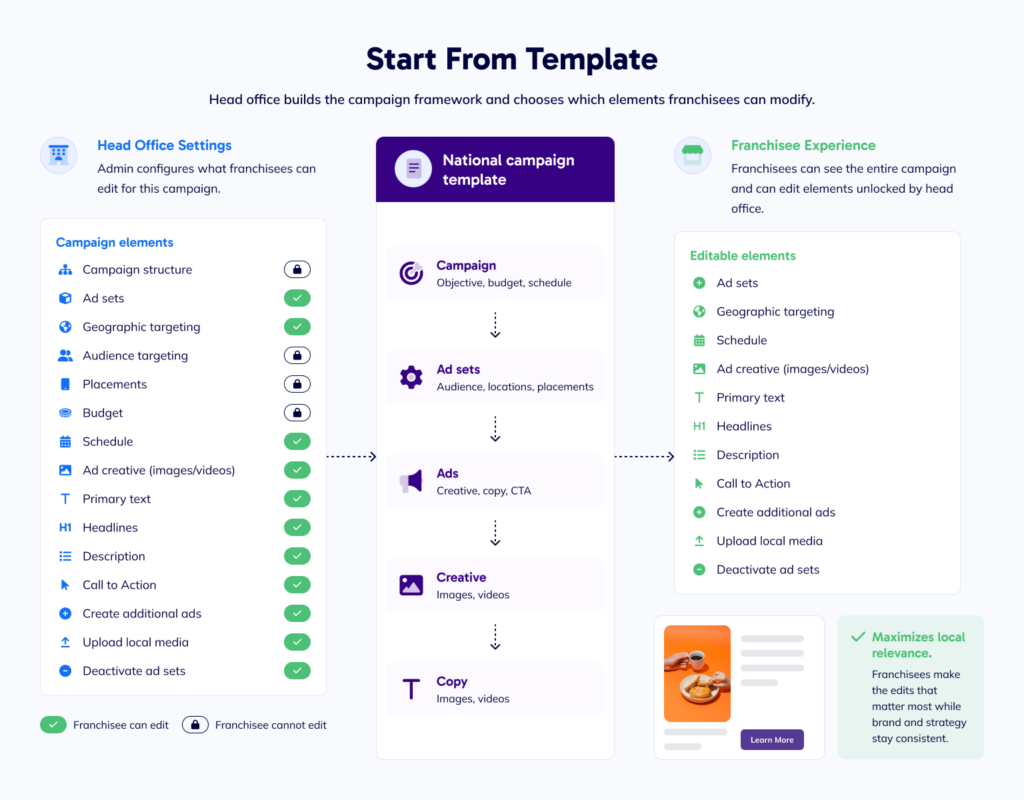
Start From Template for Flexible Campaign Customization
Start From Template provides a collaborative franchise advertising workflow that combines head-office strategy and campaign development with local franchisee knowledge.
Head office creates the campaign framework and determines which elements are fixed and which elements franchisees are permitted to customize. This allows the national team to protect the campaign strategy and brand requirements while selectively giving local users control over areas where their market knowledge can add value.
Depending on the campaign and the permissions established by head office, editable elements can include:
- Geographic targeting
- Age and gender targeting
- Detailed interest and behavior targeting
- Custom and lookalike audiences
- Placements
- Ad sets
- Individual ads
- Primary text
- Headlines and descriptions
- Images and videos
- Local media uploads
- Destination URLs
- Calls to action
- Carousel cards
Head office can configure these permissions differently for different campaigns.
For example, one Start From Template campaign might allow franchisees to select local imagery and modify advertising copy while keeping audience targeting and campaign structure locked. Another might allow an experienced franchisee to adjust geography, deactivate irrelevant ad sets and create additional ads while still working from the national campaign framework.
This creates a middle ground between a ready-to-activate Managed Campaign and a fully locally created campaign. Head office determines the boundaries of the campaign while franchisees can customize the elements where local knowledge is most useful.
Create Your Own Campaign for Highly Customizable Advertising
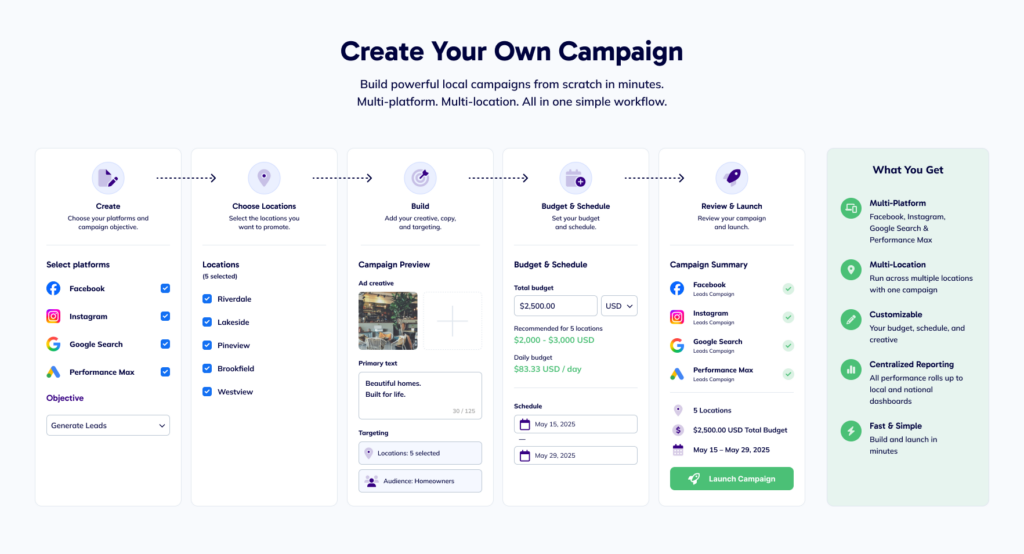
Create Your Own Campaign provides Franify’s most customizable local advertising workflow. When head office enables this workflow, authorized franchisees can build new local campaigns rather than starting from advertising prepared by the national team.
This can be particularly useful for franchisees, multi-unit operators and local marketing teams that have digital advertising experience and want to respond to opportunities specific to their markets.
Franchisees can create supported Meta and Google Performance Max campaigns through a simplified Franify workflow, including selecting targeting, developing messaging, choosing creative and configuring other campaign elements.
Importantly, enabling Create Your Own Campaign does not mean giving franchisees unrestricted access outside the franchise marketing environment. Head office determines whether the workflow is available, while locally created advertising remains connected to Franify’s broader marketing infrastructure.
Franchisees can use approved images and videos from the shared Asset Library, incorporate available localization and campaign resources, and access campaign performance through their local Franify reporting.
The campaign creation experience is also mobile friendly, allowing franchisees to build and manage local advertising through Franify’s mobile experience as well as on desktop.
This gives experienced local marketers greater freedom to respond to local events, offers, competitive opportunities and business priorities while allowing head office to maintain visibility into advertising activity across the franchise network.
Use Different Advertising Workflows Across the Same Franchise System
Franify does not require a franchise organization to apply the same advertising workflow to every campaign, location or franchisee.
Head office can manage some advertising entirely on behalf of the network, make ready-to-activate Managed Campaigns available for major initiatives, use Start From Template when local customization is valuable, and enable Create Your Own Campaign for franchisees who require greater autonomy.
These approaches can operate concurrently. For example, the same franchise system could use:
- Head Office Managed for a nationally funded brand campaign.
- Managed Campaign for a seasonal promotion that franchisees can choose to fund and activate locally.
- Start From Template for ongoing lead generation where local marketers can adjust selected campaign elements.
- Create Your Own Campaign for experienced operators who want to advertise local events, offers or business opportunities.
Head office can therefore vary the level of local participation according to the advertising initiative and the capabilities of the franchisee rather than forcing the entire franchise network into one operating model.
Franchise Advertising Permissions at a Glance
Head office can configure which advertising capabilities are available to franchisees and which campaign elements local users can edit, create or manage.
| Advertising area | What head office can make editable |
|---|---|
| Campaign workflows | Determine whether franchisees can access Managed Campaign, Start From Template and Create Your Own Campaign workflows |
| Geographic targeting | Allow franchisees to modify the geography targeted by an ad set |
| Age targeting | Allow franchisees to modify age targeting |
| Gender targeting | Allow franchisees to modify gender targeting |
| Detailed targeting | Allow franchisees to modify interest and behavior targeting |
| Custom and lookalike audiences | Allow franchisees to work with custom and lookalike audiences |
| Placements | Allow franchisees to modify advertising placements |
| Ad sets | Allow franchisees to create, delete, duplicate or activate/deactivate ad sets |
| Individual ads | Allow franchisees to create, delete or duplicate individual ads |
| Primary text | Allow franchisees to modify the main advertising copy |
| Headlines | Allow franchisees to modify advertising headlines |
| Descriptions | Allow franchisees to modify ad descriptions |
| Media | Allow franchisees to change campaign imagery or video |
| Local media | Allow franchisees to upload their own local media assets |
| Destination URL | Allow franchisees to modify the destination URL |
| Call to action | Allow franchisees to modify the CTA button |
| Carousel ads | Allow franchisees to create and add cards to carousel advertising |
Configure how franchisees collaborate on social media
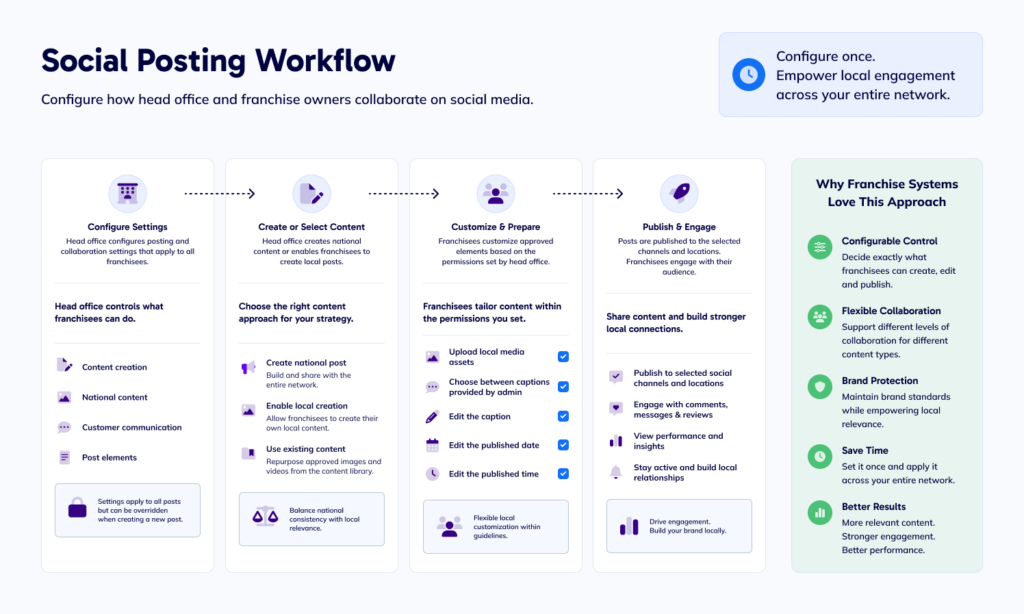
Franify applies the same configurable approach to national and local social media posting, allowing franchise organizations to determine how head office and franchisees collaborate on social content across the network.
Head office can establish posting settings that determine which social media capabilities are available to franchisees through the Franify local dashboard and mobile app. The organization can define how much control local users have over creating, editing, publishing and managing social content.
These settings cover content creation, national content editing, customer communication and the individual elements of a social post. For example, head office can determine whether franchisees can create their own local posts, modify nationally created content, upload local images or videos, edit captions, select from approved captions, adjust publishing dates and times, or engage with customers through comments, messages and reviews.
The level of local control can also vary depending on the content. Head office might give franchisees considerable flexibility for community-focused posts while maintaining tighter control over a national promotion or brand announcement. This allows franchise organizations to support local relevance without giving up the consistency and oversight that are important to a multi-location brand.
The result is a flexible social media management model built specifically for franchise systems. Head office can create, localize and distribute social content across local pages entirely from the national level, or franchisees can contribute local knowledge, content and customer engagement within the parameters established by the brand.
Configure local content creation and national post participation
Head office can determine whether franchisees have access to capabilities such as:
- Creating local social posts
- Approving national posts before publishing
- Editing national media assets
- Deleting national posts
This allows the organization to establish the appropriate relationship between nationally created social media content and local participation.
A franchise system that wants strong national coordination might rely heavily on corporate-created posts. Another might encourage franchisees to create local community content while using national content as the foundation of the overall social strategy. A third might manage social publishing entirely from head office, distributing localized content directly to local social media pages without requiring franchisees to participate.
All of these approaches can be supported within Franify.
Control which parts of a social post franchisees can edit
Head office can also configure which elements of shared social content franchisees are able to modify. Depending on the organization’s settings, franchisees can be allowed to:
- Upload local media assets
- Choose between captions supplied by the national administrator
- Edit the caption
- Edit the publication date
- Edit the publication time
These controls make it possible to create different levels of collaboration.
For example, head office could create a promotional post and provide three approved captions. Franchisees could select the caption that works best for their market and choose a local image, while the broader campaign remains consistent.
For another post, head office could allow franchisees to edit the caption itself. A more standardized corporate announcement could provide fewer local editing options.
The workflow can be configured around the content being distributed.
Configure how franchisees communicate with customers
Franify’s posting settings also allow head office to determine whether local users can engage directly with customers through connected social channels.
The available permissions include the ability to:
- Reply to comments
- Reply to messages
- Reply to reviews
This can be important for franchise systems where responsibility for customer communication varies.
Some organizations may want local franchisees or store teams responding directly because they understand the customer and the local situation. Other organizations may prefer customer interactions to be managed centrally or according to a different internal process.
Franify allows the franchise organization to establish the appropriate access for its network.
Franchise Social Media Permissions at a Glance
| Area | Head Office Can Configure |
|---|---|
| Local post creation | Whether franchisees can create local social content |
| National post approval | Whether local users approve national posts before publishing |
| Media | Whether franchisees can choose, replace or upload images/video |
| Captions | Whether users can select approved captions or edit copy |
| Scheduling | Whether publication date and time can be changed |
| Comments | Whether local users can reply |
| Messages | Whether local users can respond |
| Reviews | Whether local users can reply to reviews |
Use Dynamic Text to Localize Franchise Marketing at Scale
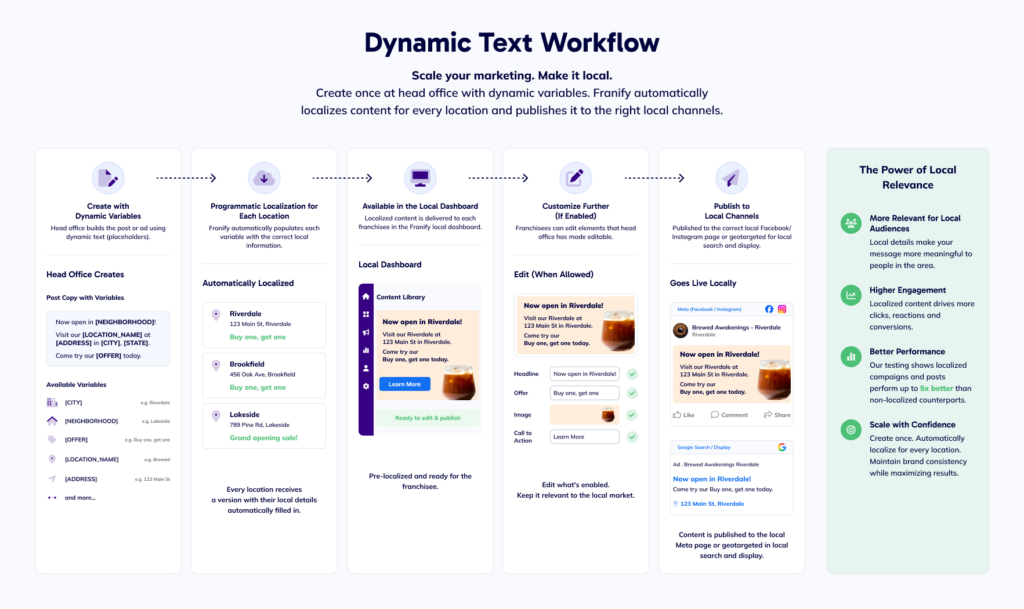
Franchise marketing often requires head office to create posts and ads at scale while ensuring that the final marketing remains relevant to individual communities. Franify’s dynamic text capability supports this process by allowing national teams to create variables that automatically populate with location-specific information.
The platform supports system variables associated with location information as well as custom variables created by the franchise organization. Examples can include information such as city, state, country, location name, franchisee name, neighborhood, street, ZIP code and product-related information.
Head office can therefore create marketing that uses a common national structure while programmatically incorporating relevant local details. Programmatic localization means Franify can take centrally created marketing and automatically adapt it for individual franchise markets using location data, dynamic text, local publishing destinations and geographic targeting.
For example, a national message could reference a location’s city or neighborhood without requiring every franchise owner to rewrite the content manually. Custom dynamic variables can also support information that is specific to the franchise organization.
Franchisee participation is not required for this localization to occur. Head office can create a national campaign or social post once and use dynamic text to programmatically produce locally relevant executions across the network. Content can incorporate market-specific information while still being created and managed centrally.
This allows franchise organizations to combine centralized marketing operations with local execution at scale. A national team can create one marketing initiative that becomes many localized executions without requiring each franchisee to recreate or manually customize the content.
Dynamic text therefore supports both collaborative and fully centralized marketing models. National teams can create scalable marketing while location-specific information helps make the final advertising or social content appropriate to each market.
Use Groups to Control Marketing Distribution Across the Franchise Network
Franchise networks are rarely uniform. Marketing opportunities may apply to a particular region, group of owners, participating markets or another segment of the network rather than every franchisee.
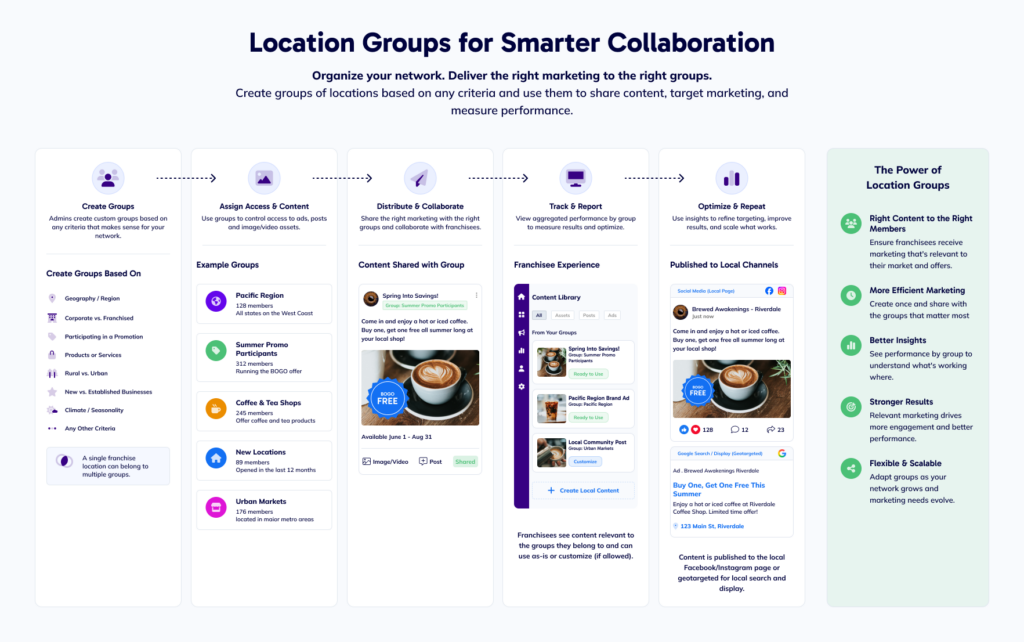
Franify allows head office to create custom groups and use them across marketing activities. These groups can control access to ads, social posts and image or video assets, while also supporting aggregated reporting. This gives national teams a practical way to organize marketing across different segments of the network without treating every initiative as either a single-location effort or a system-wide campaign.
Groups can be created using virtually any criteria that makes sense for the franchise organization. Head office might create groups based on geography, corporate versus franchised ownership, participation in a specific promotion, products or services offered, rural versus urban markets, new versus established businesses, climate or seasonality. A single franchise location can also belong to multiple groups, allowing the structure to adapt to different marketing initiatives.
For example, a franchise Location might simultaneously belong to a regional Group, a Group participating in a particular promotion and a Group offering a specific service. Head office can then use those different groupings to distribute the right marketing resources to the right parts of the network and evaluate performance accordingly.
Groups add another level of flexibility to how head office organizes marketing, distributes campaigns and content, collaborates with franchisees where appropriate, and measures performance across different segments of the franchise system.
Manage Multi-Unit Franchise Owners, Accounts and Location Access
Franchise ownership structures can become complex when an owner operates multiple locations, store managers need access to individual businesses, or different people require different levels of control over marketing, reporting and billing.
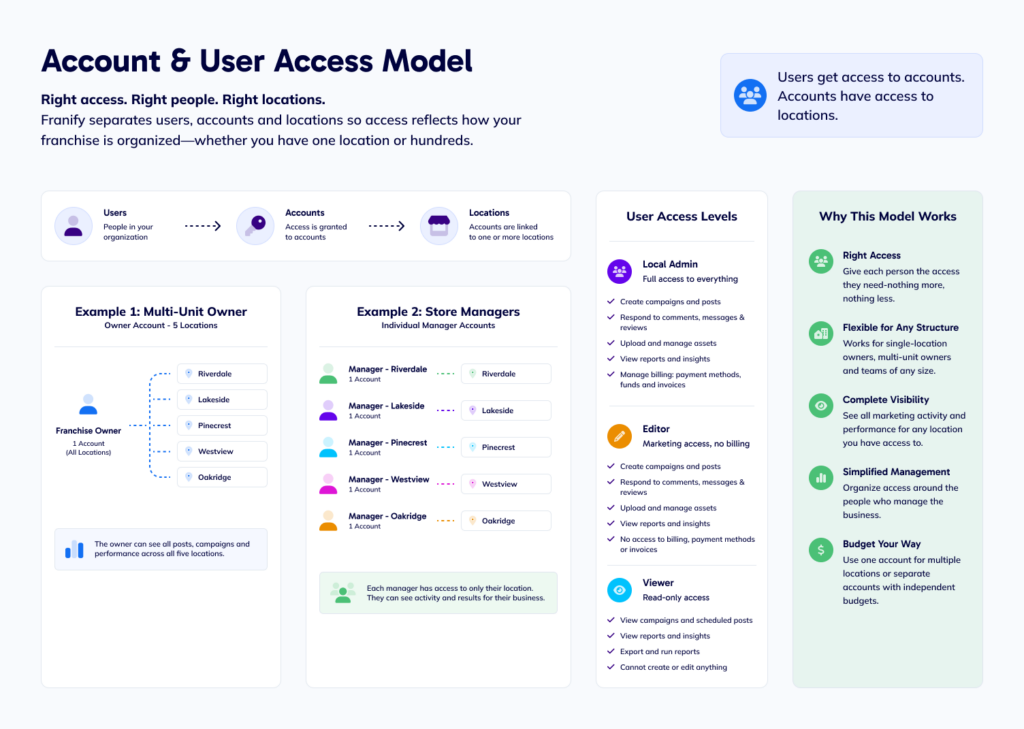
Franify is designed to accommodate these structures by separating users, accounts and locations. Users are given access to accounts, and accounts are associated with one or more franchise locations. This allows access to be configured around the way the franchise organization and individual franchise businesses actually operate.
Organize access around accounts and locations
An account can contain a single location or multiple locations. A single-location franchise owner might have one account associated with their business, while a multi-unit owner could have one account that provides access to all of the locations they operate.
The same physical location can also be included in more than one account. This makes it possible to provide different people with access to the same business without giving everyone access to the owner’s entire portfolio.
For example, consider a franchise owner with five locations. The owner could have one account containing all five businesses, allowing them to manage marketing and view reporting across the portfolio. Each store manager could then have a separate account containing only the individual location they are responsible for.
Because access ultimately connects back to the location, users with access to that location can see the marketing activity associated with it. If a store manager creates a campaign for one location, the multi-unit owner can see that campaign and its performance through their broader account. If the owner launches a campaign across all five locations, each store manager can see the campaign activity and results associated with their own business.
This creates a shared view of local marketing while still allowing access to be organized around the responsibilities of each person.
Use Local Admin, Editor and Viewer Roles to Manage User Access
Franify also supports different local user roles so access is not simply all or nothing.
A Local Admin will have full access to the local Franify experience. Depending on the capabilities enabled by head office, this can include creating campaigns and social posts, responding to comments, messages and reviews, uploading assets, viewing reporting and managing billing functions such as payment methods, account funds and invoices.
An Editor can actively participate in marketing without receiving access to sensitive financial information. Editors can create campaigns and posts, respond to customer interactions and work with other available marketing capabilities, but cannot access billing information, credit cards or invoices.
A Viewer has read-only access. Viewers can see campaigns, scheduled social content, performance information and reporting for the locations available through their account, but cannot create or modify marketing activity.
These user roles work together with the broader marketing controls established by head office. A user’s role determines the type of actions they can perform within an account, while the organization’s advertising and social settings determine which marketing capabilities are available in the first place. For example, giving someone Local Admin access does not override a head office setting that prevents local users from creating their own campaigns or editing a particular element of a national post.
This combination gives franchise organizations several layers of control. Head office can determine what the network is allowed to do, accounts determine which locations a user can access, and user roles determine what that person can do within those locations.
Account structure can also support different budgeting models
The separation between accounts and locations also has practical implications for advertising budgets and billing.
A multi-unit franchise owner who wants to manage several businesses together can use an account containing multiple locations. This can allow the owner to use one payment method and manage advertising investment across the portfolio, while still choosing whether individual campaigns and posts apply to all locations or only selected ones.
Another multi-unit owner may prefer each business to operate independently from a budgeting perspective. Separate accounts can be established so individual locations have their own payment methods, advertising funds and billing structure.
The result is an access model that can reflect both the operational and financial structure of the franchise business. A single owner can work across an entire portfolio, individual managers can focus on the businesses they are responsible for, and head office can maintain visibility and control over the broader marketing environment.
Examples of franchise marketing configurations
There is no single approach to franchise marketing collaboration that is right for every organization. Some franchise systems manage marketing entirely through head office, some involve franchisees in selected decisions, some divide responsibilities between national and local teams, and others give experienced local marketers considerable autonomy.
These broader franchise marketing operating models describe how head office and local teams can work together across advertising, social media and other marketing activities. They are distinct from Franify’s specific advertising models and workflows, including Head Office Managed advertising, Managed Campaigns, Start From Template and Create Your Own Campaign.
Franify can support each of these models. Head office can determine which advertising and social media workflows are available, which capabilities franchisees can access, and which elements of campaigns and posts can be modified locally. These settings can also vary by marketing initiative, allowing different approaches to coexist within the same franchise system.
Importantly, local marketing does not require local franchisee participation. Franify can localize and distribute marketing to individual franchise markets even when the entire program is managed by head office. What changes between these models is who participates in creating, customizing, activating and managing the marketing.
| Model | Head office role | Franchisee role |
|---|---|---|
| Head-office managed | Creates, localizes, publishes and manages marketing across the network | No participation required |
| Head-office led with franchisee participation | Creates the marketing framework and campaigns | Makes selected activation and local business decisions |
| Hybrid national and local | Provides strategy, templates, assets and selected controls | Customizes permitted elements and contributes local knowledge |
| Locally led | Provides the platform, resources, permissions and visibility | Creates and manages more of its own local marketing |
Head-office managed franchise marketing model
Some franchise organizations prefer head office to manage advertising and social media on behalf of the entire network, without requiring franchisees to participate in campaign creation, activation or publishing.
Franify supports this approach while still producing marketing that is relevant to individual local markets. The national team can create and manage social posts, Meta advertising, Google Search campaigns and Google Performance Max campaigns centrally, then distribute and programmatically localize that marketing across the franchise network.
A single national initiative can therefore produce localized executions for many franchise locations. Social content and ads can be published to the appropriate local social media pages, while digital advertising can be geographically targeted around each franchise market. Dynamic text and location data can automatically incorporate information such as city, neighborhood, location name, local offers and other market-specific details into advertising copy and social content.
The same principle can apply to search advertising. Campaign structures, keywords, messaging, landing experiences and geographic targeting can be configured for individual local markets while the overall program continues to be managed centrally.
This allows a franchise organization to operate marketing at scale while maintaining a strong local digital presence. Head office does not need to manually recreate every campaign or post for every market, and franchisees do not need to log into Franify or participate in the workflow for localization to occur.
Head office can also monitor marketing and performance across the network through centralized reporting while evaluating results at the individual location, campaign, market or group level.
In this model, head office manages the marketing while Franify provides the infrastructure to distribute, localize, publish and measure it across the franchise network.
Head-office led model with franchisee participation
Other franchise organizations may want the national marketing team to develop most advertising and social content while giving franchisees a defined role in deciding how that marketing is used within their local businesses.
For advertising, franchisees might primarily use Managed Campaigns. Head office can prepare campaigns across Meta, Google Search and Google Performance Max, including the strategy, targeting, creative, messaging and other campaign elements. Franchise owners can then make straightforward local business decisions such as whether to participate, which of their locations to include, when the campaign should run and how much they want to invest.
Social media can follow a similar approach. Head office can create national content for distribution across the network while determining which choices are available locally. Depending on the post, franchisees might be able to select an approved caption, choose imagery, adjust publication timing or participate in other ways defined by head office.
Dynamic localization can also automatically incorporate local information into centrally created campaigns and posts, reducing the amount of work required from franchisees while making the final execution more relevant to their markets.
This model allows head office to provide a coordinated marketing program across the franchise system while giving franchise owners a clear and meaningful role in how marketing is activated for their businesses.
Hybrid national and local franchise marketing model
Many franchise systems combine national and local marketing responsibilities rather than operating exclusively through head office or local teams.
In this model, the national team might develop campaign strategies, advertising templates, approved creative assets and social content while franchisees contribute local knowledge and customize selected elements of the execution.
For example, head office could build a Start From Template advertising campaign with the objective, audience strategy, placements and campaign structure already configured. Franchisees could then be permitted to adjust geographic targeting, choose from approved creative, modify advertising copy, upload local imagery or deactivate ad sets for products or services they do not offer.
A national social campaign could work similarly. Head office might develop the core post and provide several approved captions and creative options. Franchisees could select the combination that is most appropriate for their market, add local content or adjust scheduling while continuing to work from the national marketing framework.
The level of collaboration does not need to be identical for every campaign or post. A major national promotion might use a Managed Campaign with a simple local activation process, while another initiative could use Start From Template with broader customization. Social content can similarly range from nationally created posts with minimal local changes to content that gives franchisees greater opportunity to customize the final execution.
This allows national teams to provide strategy, resources and scale while franchisees contribute the market knowledge that can make individual campaigns and posts more locally relevant.
Locally led franchise marketing model
Some franchise systems have franchise owners, multi-unit operators or local teams with dedicated marketing resources that want to take greater responsibility for identifying opportunities and creating marketing for their own markets. In these organizations, franchisees may take greater responsibility for identifying opportunities and creating marketing for their own markets.
Head office can enable more advanced Franify workflows and provide broader editing and campaign creation capabilities for these users.
Franchisees might use Create Your Own Campaign to build local Meta or Performance Max campaigns through Franify. They can create campaigns for local events, products, services, competitive opportunities or other business priorities that may not be part of the national marketing calendar.
Local marketers can still work within the broader Franify environment rather than managing their activity independently across disconnected advertising platforms. They can access shared brand imagery and video, location information, dynamic landing pages and other campaign resources available through the platform.
Head office can also use Start From Template when it wants to provide a starting framework without building the entire local campaign. Depending on the configuration, franchisees can be given access to elements such as geography, targeting, ad sets, creative, copy, headlines, media and other campaign components.
Social media can follow the same model. Franchisees can be given the ability to create local posts, upload imagery and video, manage content and scheduling, and engage with customers through comments, messages and reviews where those capabilities are enabled.
Locally created activity remains within the broader Franify environment, allowing campaign activity and performance to roll up into local and national reporting. Head office therefore retains visibility across the network while local marketers have the tools to respond to opportunities in their own markets.
Different models can coexist within the same franchise system
These examples are not mutually exclusive, and a franchise organization does not need to select one model and apply it universally.
A brand could manage major national campaigns entirely through head office, offer ready-to-activate Managed Campaigns for franchisees who want to participate in local advertising, provide Start From Template campaigns when local customization is valuable, and enable Create Your Own Campaign for experienced local marketers.
Different approaches can also be used for different franchisee groups, regions, marketing channels, campaigns or types of social content. A multi-unit owner with dedicated marketing resources may work differently from a new single-location franchisee, while both remain part of the same national marketing environment.
Franify’s account and user structure can further support these differences by giving multi-unit owners access across several businesses while individual managers access only the locations relevant to them. Groups can be used to distribute campaigns, posts and assets to particular segments of the network, and user roles can provide different levels of functional access.
Franify does not prescribe how centralized or decentralized a franchise marketing program should be. It provides the workflows, permissions, localization capabilities, account structures and reporting environment that allow each franchise organization to configure national and local marketing around the way its network actually operates.
Frequently Asked Questions
Can head office control what franchisees can edit in Franify?
Yes. Franify allows national administrators to configure which marketing capabilities are available to franchisees and which elements local users can edit. These controls cover areas such as advertising targeting, campaign structure, ad copy, creative, social content, scheduling and customer communication.
Can head office allow franchisees to edit ad copy but prevent them from changing targeting?
Yes. Advertising permissions can be configured at a granular level. For example, an organization can allow franchisees to modify primary text, headlines or creative while keeping audience targeting or placements controlled by head office.
Can franchisees change geographic targeting?
Yes. Head office can configure whether franchisees are permitted to modify geographic targeting within applicable advertising workflows. This allows each franchise organization to determine whether geography should be managed centrally or adjusted locally.
Can franchisees upload their own advertising images?
Yes. Head office can allow local users to upload local media assets. The organization can combine these local capabilities with the national asset library and other advertising controls.
Can franchisees create their own ads within a corporate template?
Yes. Head office can configure Start From Template campaigns to allow franchisees to create and add their own ads. Additional settings can determine whether local users can duplicate or delete ads and ad sets.
Can franchisees create their own campaigns?
Yes. Franify includes a Create Your Own Campaign workflow that can be enabled for local users. Franchise organizations can decide whether this option should be available based on their marketing model.
Can different campaigns have different franchisee permissions?
Yes. Franify supports general advertising settings as well as configuration when campaigns are created. This allows the organization to establish default permissions while adjusting the local experience for particular campaigns where appropriate.
Can head office control whether franchisees can edit social posts?
Yes. Posting settings allow head office to configure the social capabilities available to franchisees. This includes controls around captions, media, scheduling, national posts and local content creation.
Can franchisees choose between captions written by head office?
Yes. Franify can allow franchisees to choose among captions provided by the national administrator. Head office can also configure whether local users are permitted to edit captions themselves.
Can franchisees change the image on a national social post?
Yes. Head office can configure whether franchisees can edit national media assets or upload local media for posts. The available options depend on how the organization has configured the social workflow.
Can franchisees change when a social post is published?
Yes. Head office can configure whether local users are able to edit the publication date and publication time. This gives organizations flexibility around how tightly national social scheduling is coordinated.
Can franchisees respond to social comments and messages?
Franify allows head office to configure whether local users can reply to comments and messages. The organization can therefore determine whether customer engagement is handled locally, centrally or according to its own operating model.
Can franchisees reply to online reviews?
Franify's communication settings include the ability to configure franchisee access to review responses. This can help franchise organizations establish who is responsible for local customer engagement.
Can Franify automatically localize national content?
Yes. Franify can programmatically localize centrally created marketing using Dynamic Text, structured location data, geographic targeting, local publishing destinations and other market-specific settings. Franify's AI tools can assist with creating, rewriting and varying marketing content, while Dynamic Text uses structured location information to populate appropriate local details. This allows AI-assisted content creation and programmatic localization to work together without relying on AI to generate factual location data.
Can head office create custom dynamic fields for franchise locations?
Yes. In addition to system variables, Franify allows organizations to create custom variables associated with individual Locations. This can support franchise-specific information beyond standard location fields.
Can head office send campaigns or content only to certain franchise locations?
Yes. Franify groups can be used to provide selected locations with access to ads, posts and assets. Groups can also support aggregated reporting for those locations.
What is the difference between an Account, Location and Group in Franify?
A Location represents an individual franchise business. An Account connects users with one or more Locations and determines which businesses they can access. A Group organizes Locations for purposes such as marketing distribution, campaign access, asset sharing, social publishing and reporting. A Location can be accessible through multiple Accounts and can also belong to multiple Groups, allowing Franify to reflect both the user-access structure and the marketing structure of the franchise organization.
Can a multi-unit franchise owner manage several locations through one account?
Yes. Franify separates accounts from locations, allowing one account to contain multiple locations. A multi-unit owner can therefore work across several locations through a single account.
Can a store manager have access to one location while the owner has access to several?
Yes. Because accounts and locations are separate, a location can be included in more than one account. A multi-unit owner's account can contain several locations while a separate manager account can provide access to an individual location.
Can a multi-unit franchisee use one credit card across several locations?
Yes. A multi-location account can support a shared payment and budgeting structure across the locations within that account. The owner can still choose whether individual campaigns or posts apply to all locations or selected locations.
Can each franchise location have a separate credit card and budget?
Yes. Locations can be organized into separate accounts when the operator wants independent payment methods and budgets. This allows the account structure to reflect how the multi-unit owner manages the finances of each location.
Can Franify be used without franchisees logging into the platform?
Yes. Franify can support a fully head-office-managed franchise marketing model in which the national team creates, localizes, distributes and measures advertising and social content without requiring franchisees to log in or participate in the workflow.
Can head office run localized marketing for every franchise location?
Yes. Head office can centrally manage marketing that is executed at the local level. Social content can be distributed to local social media pages, advertising can be geographically targeted to individual franchise markets, and dynamic text can incorporate location-specific information into centrally created marketing.
Does local franchise marketing require franchisee participation?
No. Local execution and franchisee participation are separate concepts in Franify. Marketing can be localized for individual franchise markets and managed entirely by head office, or franchisees can participate at whatever level the organization chooses to make available.
Can a franchise head office manage local marketing centrally?
Yes. Franify allows head office to centrally create and manage advertising and social media while distributing localized executions across individual franchise markets. Franchisees do not need to participate unless the organization wants them to.
Can one national campaign be localized across multiple franchise locations?
Yes. Franify can use location data, dynamic text, geographic targeting and local publishing destinations to turn centrally created marketing into localized executions across multiple franchise markets.
What user access levels does Franify support for franchisees and local teams?
Franify supports Local Admin, Editor and Viewer roles. Local Admins can have full local access including marketing, customer engagement, reporting and billing. Editors can create and manage marketing and customer interactions without access to billing. Viewers have read-only access to campaigns, social content and reporting. All roles remain subject to the capabilities enabled by head office.
Can Franify use different franchisee permissions for different campaigns?
Yes. Head office can establish organization-wide defaults and then adjust permissions for individual campaigns and social posts. This allows one initiative to provide broad local customization while another uses a more standardized workflow.
What can head office configure in Franify?
Franify’s configuration capabilities span several areas of national and local marketing.
| Area | Examples |
|---|---|
| Advertising workflow access | Managed Campaign, Start From Template and Create Your Own Campaign |
| Audience and targeting | Geography, age, gender, detailed targeting, custom/lookalike audiences and placements |
| Advertising structure | Creation, deletion, duplication and activation of ads and ad sets where enabled |
| Advertising creative | Primary text, headlines, descriptions, media, local uploads, URLs, CTAs and carousel cards |
| Local social creation | Whether franchisees can create their own posts |
| National social content | Approval, media editing and management of national posts |
| Social post editing | Captions, caption choices, local media, publication dates and publication times |
| Customer communication | Replies to comments, messages and reviews |
| Localization | System and custom dynamic text associated with individual locations |
| Network distribution | Groups used to provide access to ads, posts and assets |
| User access | Accounts and users associated with one or multiple locations |
| Multi-unit management | Multiple locations within an account and selected-location campaign/post execution |
| Budgeting structure | Shared account-level payment and budgeting or separate account structures by location |
| Centralized marketing distribution | Create, localize and distribute advertising and social content across franchise markets without requiring franchisee participation |
| Local execution | Publish to local social media pages and geographically target advertising around individual franchise markets |
| Local user roles | Local Admin, Editor and Viewer access levels |
| Role-based permissions | Full local management, marketing without billing access, or read-only reporting and visibility |
The exact configuration can be established according to the needs of the franchise organization and the workflows it wants to provide to local users.
Configure Franify around the way your franchise system works
Franchise organizations differ in how they manage national and local marketing. Some manage advertising and social media centrally, some involve franchisees in selected decisions, and others give experienced local marketers substantial autonomy. Those responsibilities can also change depending on the campaign, content, market or franchisee.
Franify gives national teams the infrastructure to support each of these models. Head office can create, programmatically localize and distribute marketing across the network without requiring franchisee participation, or configure what franchisees can access, edit, create and manage.
The result is a franchise marketing platform that can support centralized marketing distribution, programmatically localized national campaigns, collaborative national-to-local workflows, locally created marketing, multi-location account management and consolidated local and national reporting within the same environment.
Learn more about our business
We’re a Parisian floral studio known by our made-to-order floral art pieces with fresh and dry flowers, leaves and branches.
Featured
The podcast you’ve been waiting for.
A podcast where we talk about financial literacy, that can help you take your investing to the next level.